
Core Concepts and Execution Model
This page is the concept cheat-sheet: short definitions of every entity, organised into three layers (high-level execution model, session internals, and settings). For the design rationale behind each entity, read Core concepts under Explanation.
High Level
Section titled “High Level”Harness and Agent are configuration containers: they hold capabilities and define behavior. At runtime, their configuration merges into a RuntimeAgent which executes inside a Session.
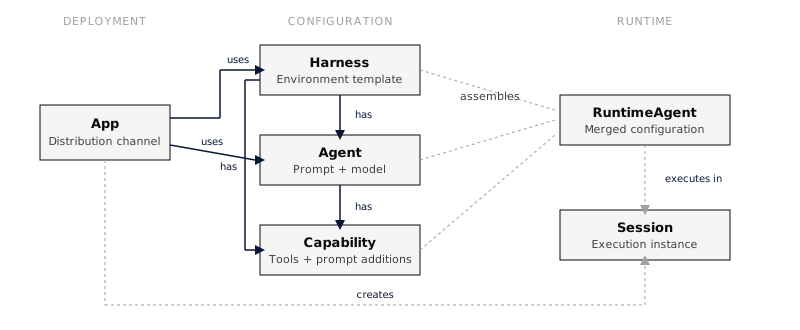
- Solid arrows: configuration ownership: Harness has Agents and Capabilities, Agent has Capabilities
- Dashed arrows: runtime assembly: config merges into RuntimeAgent, which executes in a Session
Harness
Section titled “Harness”A Harness is the top-level entity that represents a setup for agent execution. It defines the infrastructure, defaults, and constraints under which sessions run, configuring how agents are invoked, which capabilities are available by default, and what execution environment is provided.
- There can be many harnesses in the system
- Each session has exactly one assigned harness
- A harness can have capabilities attached to it
An Agent is a domain-specific or task-specific configuration for the agentic loop. It defines the system prompt, the default LLM model, and which capabilities are enabled.
- There can be many agents in the system
- A session may or may not have an agent assigned
- Agents can be assigned or changed during the lifetime of a session
- Each agent has capabilities with position ordering
- Each agent references a default LLM model
Session
Section titled “Session”A Session is a working instance of an agentic loop. It is configured by its harness and, optionally, by an agent. Sessions are the primary execution context where conversations happen.
- There can be many sessions in the system
- Each session has an assigned harness
- The agent is optional and can change over the session’s lifetime
- Sessions can have their own capabilities, which are additive to the agent’s capabilities
- Sessions can override the LLM model
- Status flow:
started→active→idle(sessions work indefinitely)
Capability
Section titled “Capability”A Capability is a modular, reusable configuration unit that extends the behavior of a harness, agent, or session. Each capability can contribute:
- System prompt additions: text prepended to the agent’s prompt
- Tools: functions the agent can invoke
- Mount points: files and directories populated in the session filesystem
- Can be attached to a harness, an agent, or a session
- Session capabilities are additive to agent capabilities
- Built-in capabilities use
snake_caseIDs (e.g.,current_time,web_fetch) - MCP servers appear as virtual capabilities with
mcp:{uuid}IDs - Capabilities can depend on other capabilities, resolved in topological order
See Capabilities for a full list and configuration details.
A Tool is a function the agent can invoke during execution. Tools are provided by capabilities.
- Built-in tools have no name prefix
- MCP tools are prefixed:
mcp_{server_name}__{tool_name} - Executed during the act phase of a turn
An App is a deployable unit that binds a Harness and Agent to a distribution channel such as Slack. Apps provide a publish/unpublish lifecycle, only published apps accept incoming requests from their configured channel.
- Each app references exactly one Harness and one Agent
- Each app has a channel type (e.g.,
slack) with channel-specific configuration - Lifecycle:
draft→published→draft(orarchived) - Incoming messages are routed to sessions based on a configurable strategy (e.g., per-thread, per-channel, per-user)
See Apps for setup and configuration.
Session Internals
Section titled “Session Internals”Each session contains turns, messages, events, an isolated filesystem, and key-value storage.
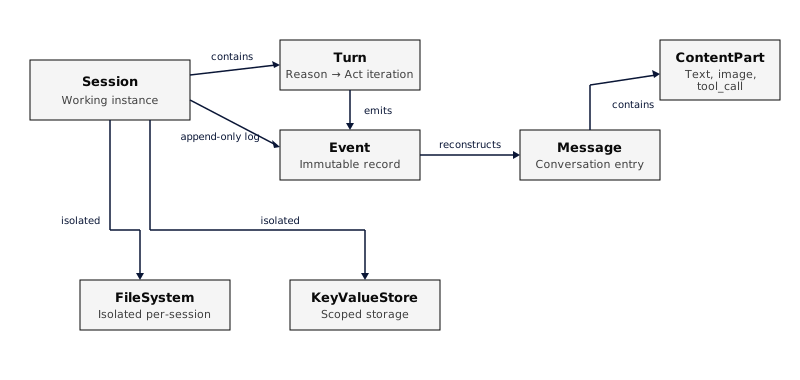
A Turn is one iteration of the agent loop: reason (call the LLM) then act (execute tools).
- Each turn belongs to a session
- A turn produces messages and emits events
- Lifecycle:
turn.started→ reason → act →turn.completed(orturn.failed)
The Agentic Loop
Section titled “The Agentic Loop”Understanding the reason-act loop is key to building effective agents. Here’s what happens inside each turn:
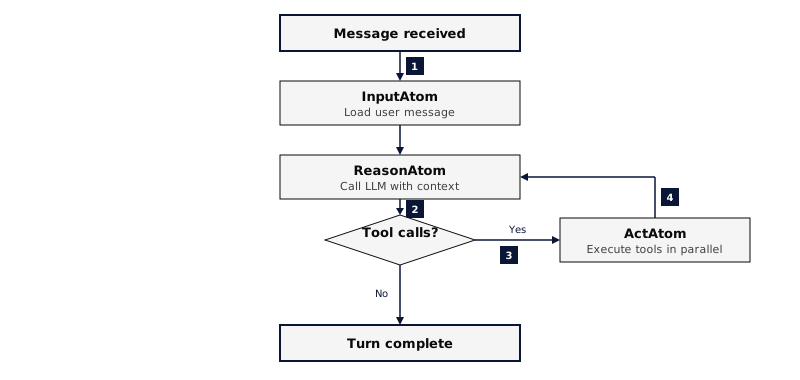
Each iteration:
- Reason: The LLM receives the full conversation history (system prompt + messages + tool results) and produces either a text response or tool calls
- Act: All tool calls from the LLM are executed in parallel. Results are added to the conversation history
- Loop: If there were tool calls, go back to Reason. If the LLM produced a final text response, the turn is complete
The loop runs for a maximum of 10 iterations per turn to prevent runaway execution.
Durable Execution
Section titled “Durable Execution”In production mode (PostgreSQL-backed), each step is a separate durable task:
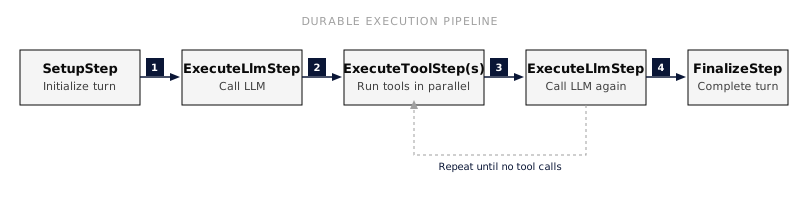
If a worker crashes mid-turn, the control plane detects the missed heartbeat and re-queues the task for another worker. Your application sees a brief delay, not a failure.
Message
Section titled “Message”A Message is a conversation entry reconstructed from the event log. Messages are not stored in a separate table.
- Roles:
user,agent,tool_result - Content is an array of parts: text, image, tool_call, tool_result
- Agent messages may include extended thinking content from reasoning models (Anthropic Claude, OpenAI GPT-5.x and o-series)
- Supports per-message controls such as model override and reasoning effort
An Event is an immutable, append-only record. Events are the primary data store for conversations and SSE notifications.
- Atomic per-session sequence numbering
- Types: input, output, turn, atom, tool, LLM, session lifecycle
- Cannot be updated or deleted
- Carries correlation context: turn ID, input message ID, execution ID
See Events for the full event reference.
File System
Section titled “File System”Each session has an isolated virtual filesystem stored in PostgreSQL.
- Paths are relative to
/workspace - Capabilities can mount initial files and directories
- Shared between the FileSystem and BashkitShell capabilities
- Files support an optional read-only flag
Key-Value Store
Section titled “Key-Value Store”Each session has scoped storage with two tiers:
- Key/Value: plain text storage for general data such as state, preferences, or intermediate results
- Secrets: AES-256-GCM encrypted at rest for API keys, tokens, and credentials
- Storage is session-isolated and cannot be accessed across sessions
Settings
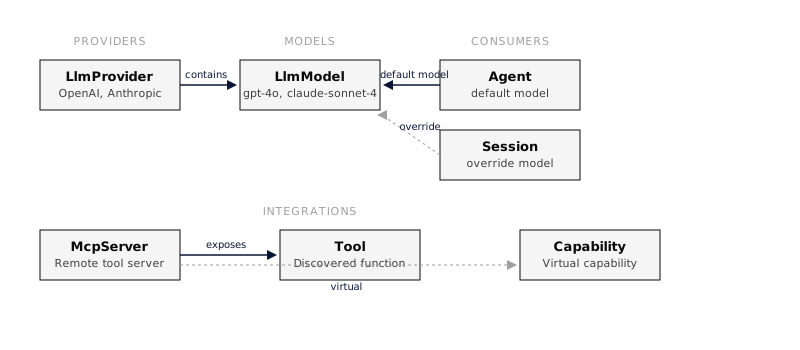
Section titled “Settings”System-wide configuration for LLM providers, models, and MCP servers.
LLM Provider
Section titled “LLM Provider”An LLM Provider is a configured API provider such as OpenAI or Anthropic. Providers store encrypted API keys and contain models.
- Provider types include
openai,openrouter,openai_completions,anthropic,gemini, andbedrock - Each provider contains many models
- Default providers (OpenAI, Anthropic) are seeded on startup
LLM Model
Section titled “LLM Model”An LLM Model is a specific model within a provider (e.g., gpt-4o, claude-sonnet-4).
- Each model belongs to one provider
- Sources: predefined, discovered from the provider API, or manually added
- Model resolution priority: message controls → session override → agent default → system default
MCP Server
Section titled “MCP Server”An MCP Server is a remote server that exposes tools via the Model Context Protocol. MCP servers are integrated as virtual capabilities.
- Each server becomes a capability with ID
mcp:{server_uuid} - Tools are discovered at runtime and cached with a 24-hour TTL
- Tool names are prefixed to avoid conflicts:
mcp_{server}__{tool} - Execution happens via HTTP JSON-RPC