
Harnesses
A harness defines the base environment for sessions: the system prompt foundation, the default model, and a bundle of capabilities. Every session is assigned exactly one harness. Agents and sessions then layer their own configuration on top.
Think of a harness as the “starter kit” shared across many agents, operations-side defaults that survive even when individual agents change.
For the design rationale (why three configuration layers exist), see Concepts.
Built-in harnesses
Section titled “Built-in harnesses”| Harness | What it provides | Best for |
|---|---|---|
| Base | Empty, no capabilities | Minimal agents, custom tool composition, testing |
| Generic | Core capabilities most agents need | General-purpose assistants, coding tasks, research |
| Data Analyst | Generic plus SQL, charts, memory | Data workflows |
| Platform Chat | Focused platform command surface | Operator chat |
The Generic harness is the recommended default. See the Built-in harnesses reference for the exact capability bundle each one ships with.
Naming
Section titled “Naming”Every harness has two names:
name: stable URL-friendly slug (generic,deep-research). Unique per org. Use this in API calls, CLI, code.display_name: human label shown in the UI.
name format: [a-z0-9]+(-[a-z0-9]+)*, max 64 chars, no consecutive hyphens.
How harnesses combine with agents and sessions
Section titled “How harnesses combine with agents and sessions”The system prompt is built from three layers, each wrapped in XML tags:
- Harness capabilities (foundation)
- Agent capabilities (role)
- Session capabilities (per-conversation extras)
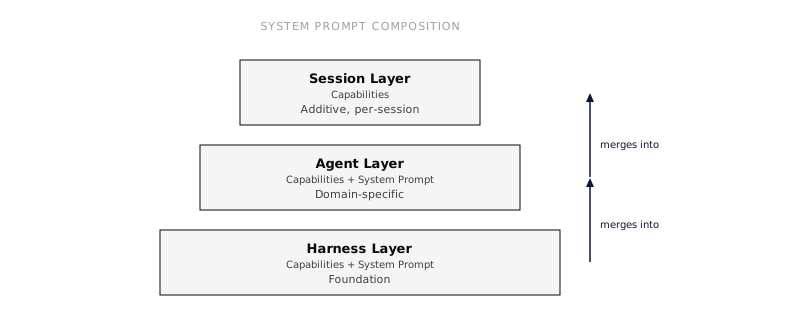
The merge is associative: a chain of inherited harnesses produces the same RuntimeAgent as a single pre-merged harness.
The base system prompt is optional
Section titled “The base system prompt is optional”A harness bundles more than a prompt, capabilities, MCP servers, a default model, network access, and starter files. Because of that, the base system_prompt is optional. Omit it (or leave it empty) when a harness exists only to add capabilities or MCP servers on top of a parent: the effective prompt is then composed entirely from the parent harness, the agent, the session, and capability contributions. Empty or whitespace-only prompts contribute nothing, and if no layer contributes a prompt the agent runs with no base system prompt at all.
Do something
Section titled “Do something”- Customize a harness, build your own as a base for many agents.
- Equip an agent with tools, add capabilities at the agent layer.
See also
Section titled “See also”- Built-in harnesses, reference for the shipped harnesses.
- Concepts, entity model.